How to use the Back of Shirt Decal Size
- Choose the unit first so every back of shirt decal size result is shown consistently in inches or centimeters.
- Select the main setup fields, including unit, garment, size, and enter actual blank measurements whenever you have them.
- Review the result and next-step note before cutting, ordering, printing, or pressing.
- Copy the result into order notes, print the guide for the workbench, or download the text result for the job folder.
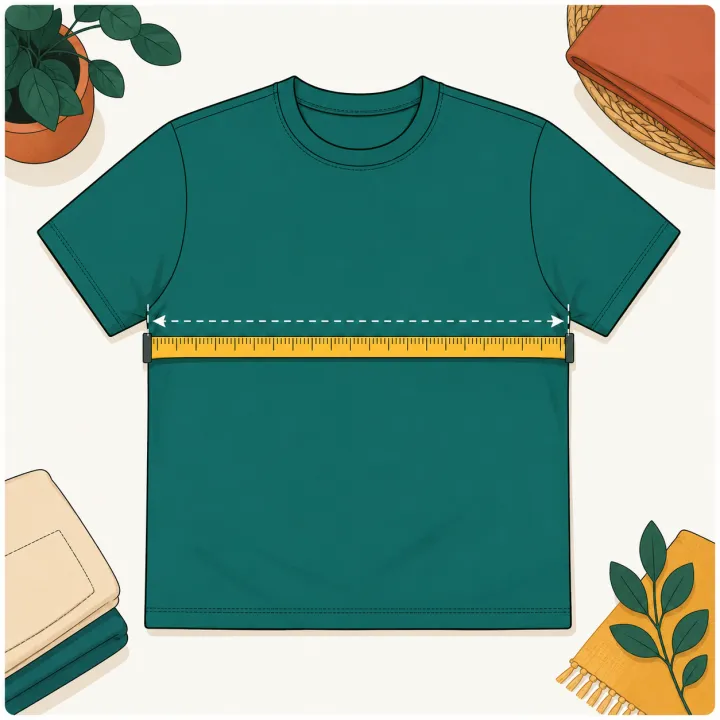
- Measure the actual garment or blank before production and run one test press when the blank is new.
Real-world examples
Back of Shirt Decal Size worked example
Inputs
- Unit: inches
- Garment: Adult tee
- Size: Adult L
- Back style: Full back
- Design aspect ratio: 1.25
Result
The tool starts around 11.88 in wide by 9.50 in high, with a full back collar drop around 3.5-4 in.
Production check
Measure actual back width, confirm the design clears collar and shoulder seams, and use a paper test for tall artwork.
Adult large full back print
Inputs
- Adult L tee
- Full back style
- Design ratio: 1.25
- Unit: inches
Result
Start around 11-12 in wide and keep the top of the design about 3.5-4 in below the collar before checking the actual shirt.
Production check
Use a paper mockup to confirm the print does not crowd shoulder seams or look too low.
Hoodie upper back design
Inputs
- Adult XL hoodie
- Upper back yoke
- Design ratio: 2.5
- Unit: inches
Result
Use a wide, short layout and keep height near the yoke cap so the hood does not hide the design.
Production check
Lay the hood down naturally before choosing the final top edge.
Units and parameters
Keep units consistent from design setup through pressing notes. When the tool provides a preset, use it as a planning value and replace it with the actual garment or blank measurement when possible.
| Input or rule | What it changes |
|---|---|
| Unit | Choose the option that matches the job. Starting value: in. Options include Inches, Centimeters. |
| Garment | Choose the option that matches the job. Starting value: adult-tee. Options include Adult tee, Youth tee, Hoodie or sweatshirt. |
| Size | Choose the option that matches the job. Starting value: adult-m. Options include Adult XS, Adult S, Adult M, Adult L. |
| Back style | Choose the option that matches the job. Starting value: full-back. Options include Full back, Upper back (yoke), Across shoulders. |
| Actual chest width | Enter a measurement or quantity. Optional. Leave blank to use the size preset. |
| Design aspect ratio | Enter a measurement or quantity. Starting value: 1.25. Width divided by height. Use 1 for a square logo. |
| Formula | Back decal width = measured or preset chest width x back style factor, capped at a practical heat press and gang sheet limit. Height = width / design aspect ratio with style-specific height caps. |
| Production check | Measure the actual shirt or hoodie before production. |
Rule and assumptions
Back decal width = measured or preset chest width x back style factor, capped at a practical heat press and gang sheet limit. Height = width / design aspect ratio with style-specific height caps.
- Measure the actual shirt or hoodie before production.
- Large back designs do not scale linearly on 2XL-5XL shirts.
- A common 15 x 15 heat platen and gang sheet width can make 14 in a practical upper limit.
Use this tool for
- Sizing a full back shirt decal before cutting HTV or ordering DTF.
- Choosing an upper back yoke logo size without making the artwork too tall.
- Planning hoodie back placement with hood clearance.
- Checking large adult shirt back print limits against a practical press or gang sheet size.
Worked example
Inputs
- Unit: inches
- Garment: Adult tee
- Size: Adult L
- Back style: Full back
- Design aspect ratio: 1.25
Result
The tool starts around 11.88 in wide by 9.50 in high, with a full back collar drop around 3.5-4 in.
When to use this
Use this when a design belongs on the back of the shirt and a front decal chart does not answer collar drop or yoke height.
What to check before pressing
Measure actual back width, confirm the design clears collar and shoulder seams, and use a paper test for tall artwork.
Quick reference chart
| Use case | Starting point | Check before pressing |
|---|---|---|
| Full back | 10 to 13 in wide | Use the full back area below collar clearance |
| Upper back yoke | 8 to 12 in wide | Cap height around 5 in |
| Across shoulders | 9 to 13 in wide | Cap height around 4 in |
| Hoodie back | 10 to 12 in wide | Drop lower for hood clearance |
Common mistakes
- Scaling a back print linearly for plus sizes until it exceeds the press or sheet size.
- Placing a hoodie back design so high that the hood covers it.
- Using an upper-back yoke layout with artwork that is too tall.
- Ignoring collar drop and shoulder seams before pressing.
FAQ
How big should a back of shirt design be?
For many adult shirts, a full back design starts around 10.5-12.5 inches wide, with larger adult sizes often staying near 12-14 inches instead of scaling linearly. Youth and toddler shirts need smaller widths.
How far below the collar should a back decal go?
A full back design usually starts about 3.5-4 inches below the collar. Upper back yoke or across-shoulder designs often start closer to 1.5-2.5 inches below the collar.
What is an upper back yoke decal size?
An upper back yoke decal is usually wider and shorter than a full back print. Use a width near 8-12 inches depending on garment size, and keep height capped around 5 inches.
Is hoodie back placement different from T-shirt back placement?
Yes. A hoodie can cover the upper back print, so the design often needs to sit lower. Check hood coverage, thick seams, and pocket or zipper structure before pressing.
Will a 16 inch design fit on a gang sheet or heat press?
It depends on your sheet and press, but many heat press and transfer workflows treat about 14 inches wide as a practical maximum. Check your actual sheet size, platen, and blank before production.